โšก QuantPod v1.4.0 Released: Core Anchor Basket, Anti-Churn Session Circuit Breakers & Midday Filter Get Desktop License →
QuantPod DESKTOP

Autonomous Quantitative Terminal

BRING YOUR OWN ALPACA KEYS // SELF-HOSTED WINDOWS TRADING BOT

The Autonomous Trading Terminal Built for Capital Preservation.

Stop gambling on black-box retail bots with 4x margin. QuantPod is an institutional-grade Alpaca day trading bot and desktop quantitative terminal with zero borrowed leverage, an 80/20 multi-manager pod structure, and mandatory 5-gate paper incubation before live capital.

Leverage Used
Strictly 0.0x (Zero)
Prohibits debt liquidation
Pod Allocation
80% Core / 20% Tactical
Multi-manager pod design
Overnight Protection
100% Cash at 3:50 PM
Zero debt • Optional Core ETF
Data Feeds
Free IEX & SIP Tape
Sub-second WebSocket stream

The QuantPod Desktop Experience

A look inside the standalone Windows application running locally on your hardware

QuantPod // Autonomous Day Trading Terminal
FEED: IEX LIVE PODS: ACTIVE (80/20) LICENSE: PRO
Execution Mode
Paper Sandbox
Forward Simulation
Architecture
80/20 Dual Pod
Trend + Mean Reversion
Risk Allocation
1.0% Risk / 20% Cap
35% max sector guard
Market Close Flat
3:50 PM EST
Daily cash conversion
*Simulated interface visualization. Strategy testing and past simulated results do not represent actual trading and do not guarantee future performance.
Senior Quant Core (80%) MOMENTUM CORE

Captures institutional breakouts with twin-tranche execution: 50% scale-out at 1.8x risk, remaining 50% trailing ATR stop.

Tranche 1 Target: 1.8:1 Trailing Stop: 2.0 ATR
Junior Tactical Desk (20%) VWAP MEAN REVERSION

Trades mean-reversion pullbacks to VWAP standard deviation bands with strict 2% daily sleeve cut-off.

RSI Trigger: <30 / >70 Band: 2.0 Std Dev
AUTHENTIC WINDOWS DESKTOP INTERFACE

Inside the QuantPod Algorithmic Day Trading Terminal

Explore actual screenshots of real-time multi-pod execution, automated market scanners, and institutional risk protection engines running locally on Windows.
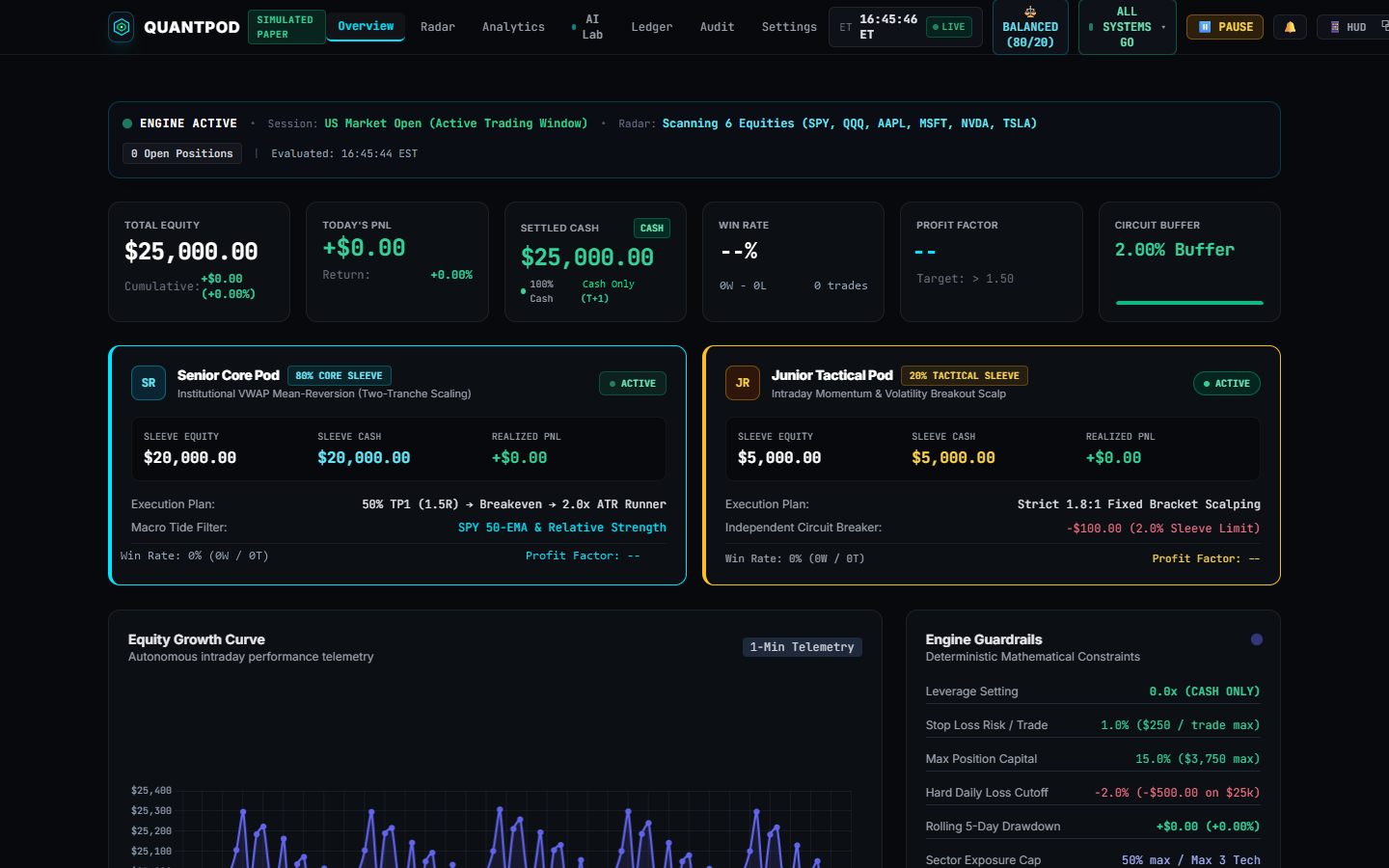
QuantPod algorithmic trading dashboard overview displaying equity curve, pod performance, and live market status

Executive Portfolio & Pod Dashboard LIVE COCKPIT

Monitor unified portfolio equity, daily realized P&L, real-time win rate, and active 80/20 senior and tactical pod allocations.
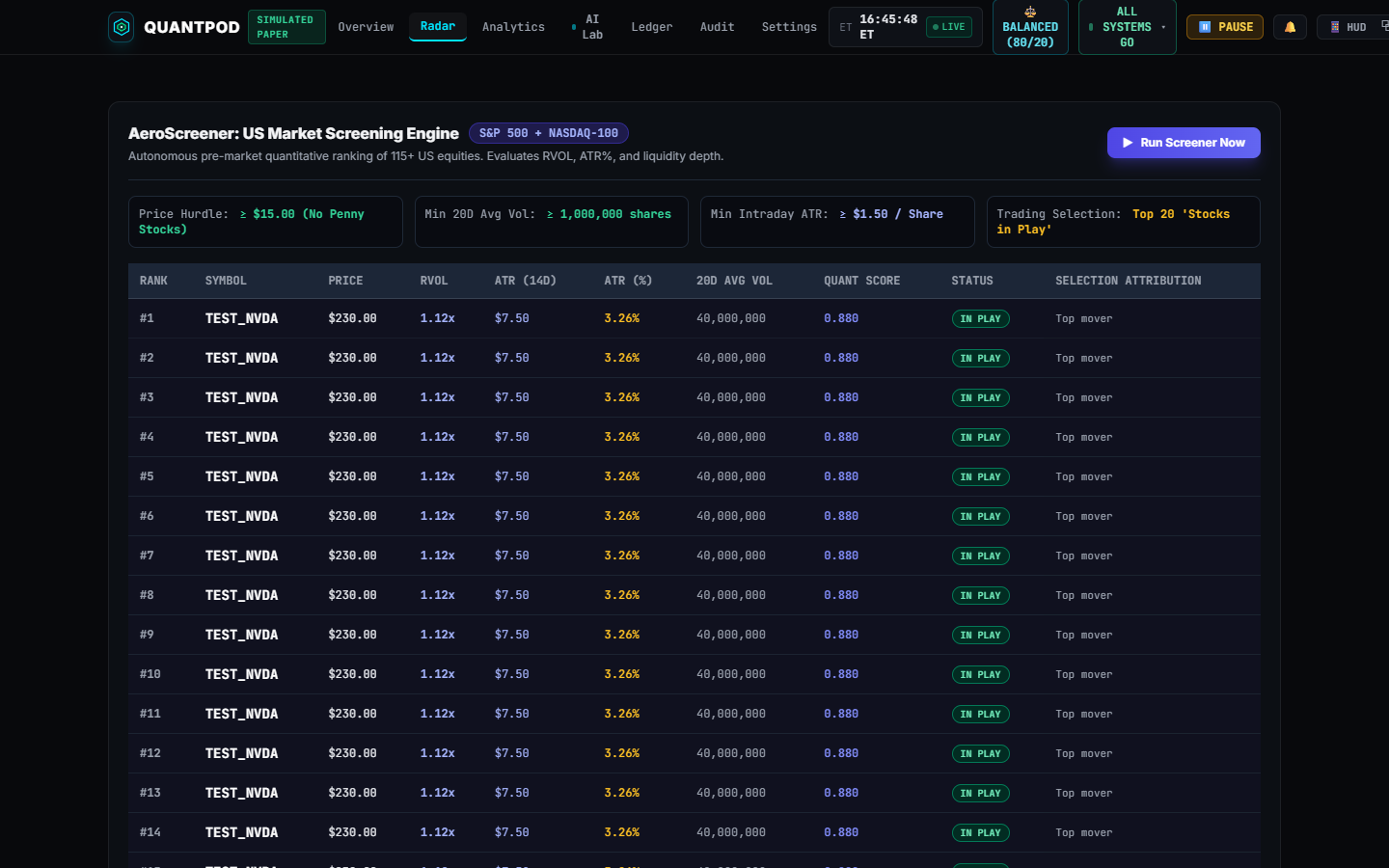
Automated 20-stock US market radar scanner filtering relative volume, volatility, and institutional order flow

Dynamic 20-Stock US Radar Scanner MARKET SCREENER

Pre-market screening of the top 126 liquid US equities to isolate high-probability momentum setups before the 9:30 AM opening bell.
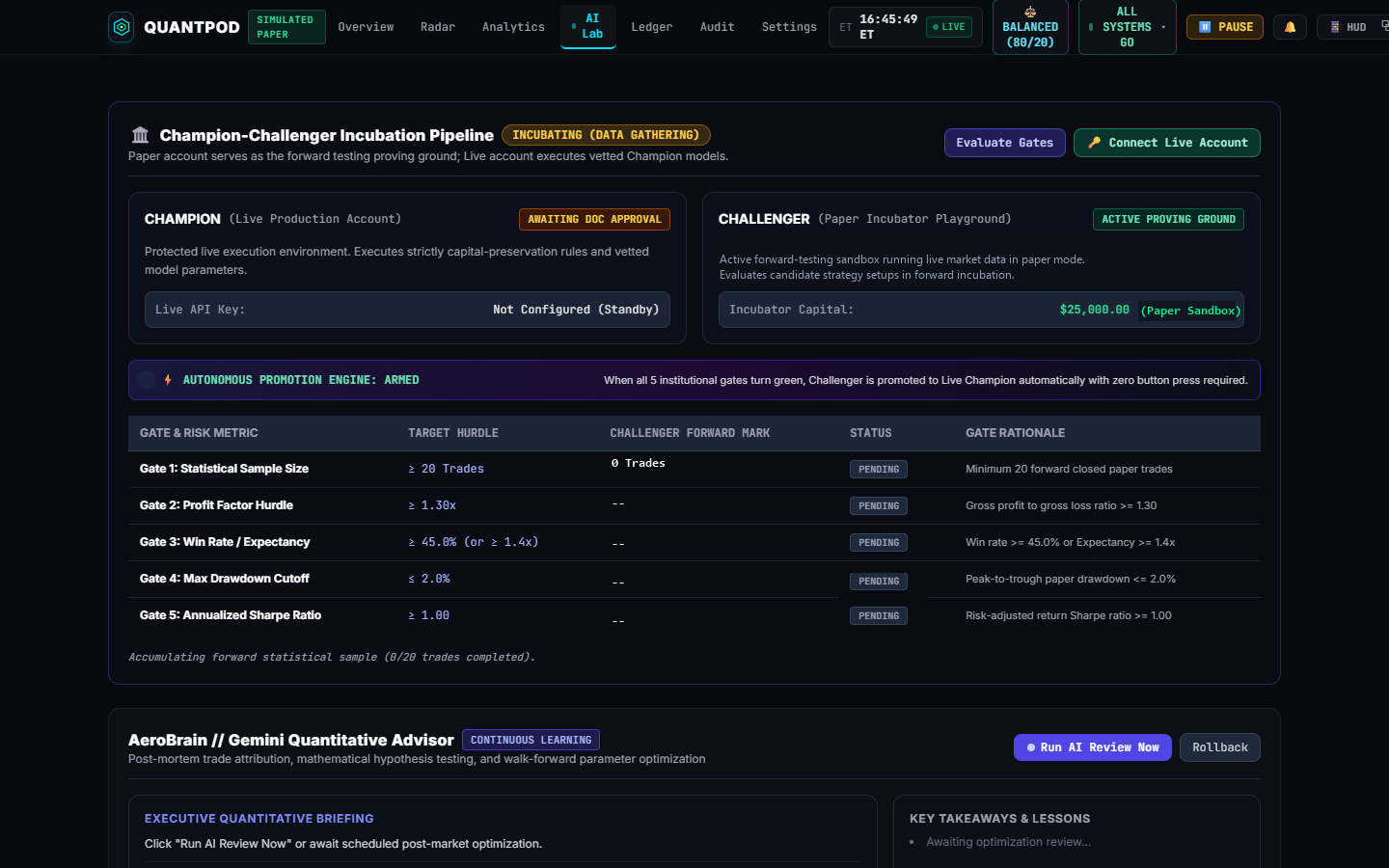
QuantPod 5-gate paper incubation testing lab ensuring statistical edge before allocating live capital

5-Gate Paper Incubation Lab VALIDATION ENGINE

Mandatory forward statistical validation checking profit factor (>1.30), win rate (>55%), and maximum drawdown (<2%) prior to live execution.
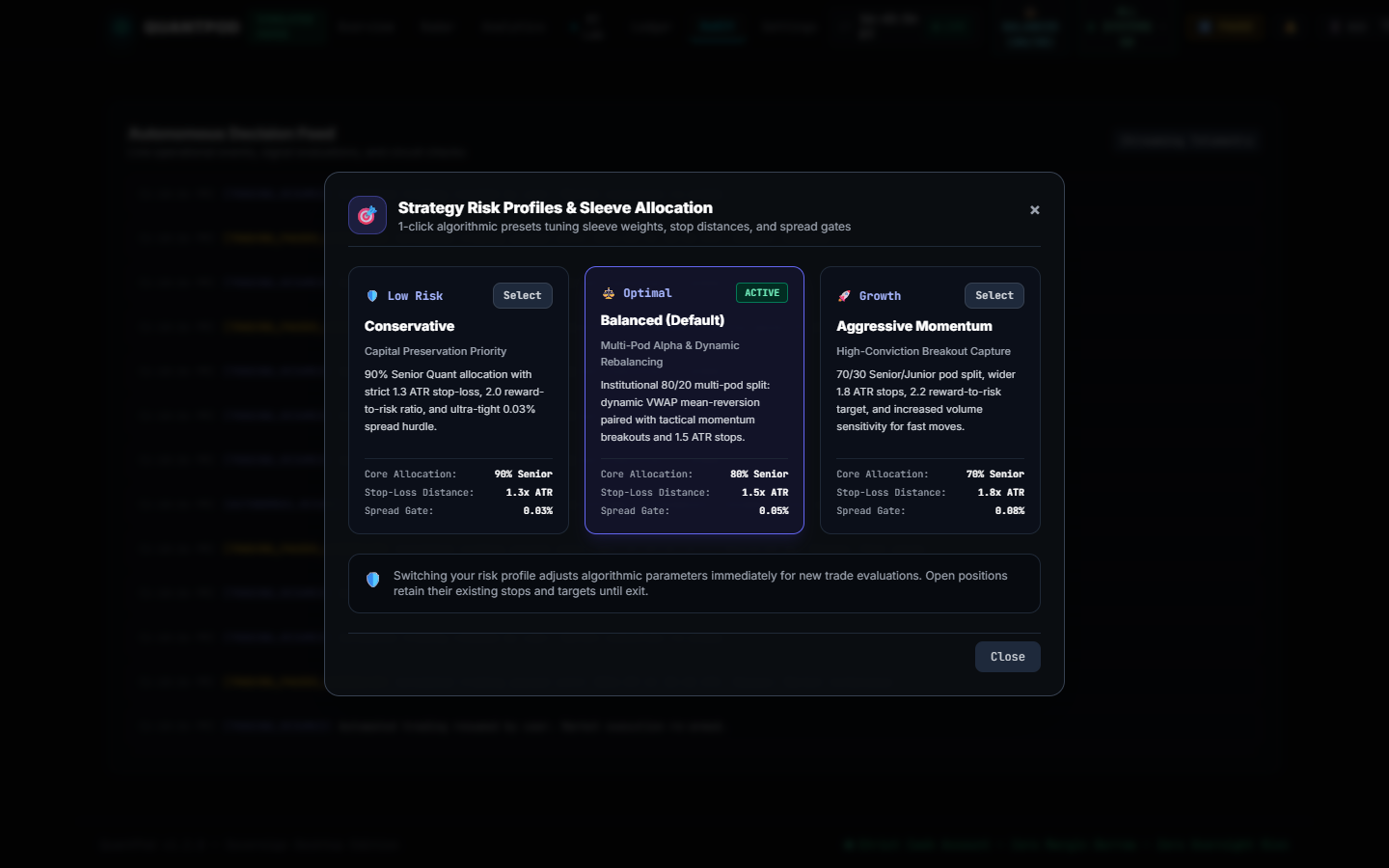
Configurable risk parameters and small-account PDT protection guardrails for Alpaca trading

Small-Account Risk Guardrails & Circuit Breakers CAPITAL DEFENSE

Enforces hard daily loss limits, 1% risk per trade, zero borrowed margin, and mandatory portfolio flattening at 3:50 PM EST.

Why QuantPod Is in a Different League

Most trading bots fail because they are designed by marketers promising easy riches. QuantPod was architected like a quantitative asset management fund.

๐Ÿ›ก๏ธ

Capital Preservation First

Zero borrowed margin. Hard 1% risk cap per stop loss, 20% maximum allocation per ticker, 35% institutional sector exposure limits, and automated cash conversion by 3:50 PM EST to protect capital from overnight gap risk.

๐Ÿ›๏ธ

Multi-Manager 80/20 Pods

Multi-manager quantitative pod architecture: an 80% Senior Quantitative Core focusing on trend momentum, balanced with a 20% Junior Tactical Desk designed for mean-reversion market dynamics.

๐Ÿงช

5-Gate Paper Incubation

Never risk real capital on untested parameter curves. QuantPod automatically tests parameters on forward paper trading, demanding a strict 5-gate statistical pass before live promotion.

๐Ÿ“ก

Sub-Second WebSocket Feeds

Dynamic feed detector routes requests dynamically between Alpaca's free IEX feed and $99 Consolidated Tape (SIP) with sub-second WebSocket streaming and in-memory price caching.

How It Works in 3 Simple Steps

Get up and running in under 5 minutes with complete control over your brokerage

01

Download Desktop Terminal

Download `QuantPod.exe` for Windows. The application runs 100% locally on your desktop or laptop with no external server dependencies.

02

Connect Your Broker API Keys

Create a free commission-free account on Alpaca Securities. Paste your API Key and Secret directly into the terminal settings. Your keys never leave your PC.

03

Start Autonomous Trading

Activate the trading loop. QuantPod scans the 115+ most liquid US equities each morning, executes bracket orders with multi-sector guardrails, and flattens active intraday positions by 3:50 PM EST.

Simple, Transparent Licensing

Bring your own broker keys. No hidden transaction fees, no profit splits, no custody.

Starter (Paper Sandbox)
Free incubation

Ideal for traders testing strategies in paper trading before risking real capital.

  • โœ“Paper Trading Incubation Lab
  • โœ“Offline Simulation Sandbox
  • โœ“Standard Mega-Cap Universe (SPY, QQQ)
  • โœ“Free Alpaca IEX Market Data
  • โœ“1 Hardware Device Activation
Downloads Paused
Most Popular
Professional Edition
$99 / month

Full institutional multi-manager pod execution for active quantitative accounts.

  • โœ“Multi-Manager 80/20 Pod Architecture
  • โœ“Dynamic 20-Stock US Radar Screener
  • โœ“Automated 5-Gate Promotion Engine
  • โœ“Sub-Second WebSocket Streaming & SIP Support
  • โœ“Instant Mobile & Webhook Push Alerts
  • โœ“1 License Key (Single Device Activation)
Start Pro Subscription →
Lifetime Quant License
$999.99 one-time

For serious traders who hate recurring monthly software subscriptions.

  • โœ“All Professional Features Forever
  • โœ“Permanent Non-Expiring License Key
  • โœ“Lifetime In-App Application Updates
  • โœ“1 Permanent License Key (Single Device Activation)
  • โœ“Self-Hosted & Zero Cloud Dependency
Get Lifetime Access

Getting Started Guide & Instructions

Everything you need to know to safely set up and operate QuantPod

1 Setting Up Your Alpaca Brokerage Account

QuantPod connects directly to Alpaca Securities LLC, a FINRA and SIPC-registered broker offering 100% commission-free US stock trading with native high-speed API execution.

  • Visit alpaca.markets and sign up for an individual account.
  • In your Alpaca dashboard, switch to Paper Trading to generate your free paper API Key ID and Secret Key.
  • Once you are ready for real capital, generate your Live Trading keys.

2 Activating Your Commercial License

When you purchase QuantPod, your license key is delivered instantly via email. Upon launching the terminal for the first time:

  • Accept the standard CFTC Rule 4.41 risk disclosure.
  • Click the LICENSE: UNLICENSED badge in the top bar.
  • Paste your key and click Activate License. The software binds securely to your hardware ID with an offline grace period.

3 Operating the Terminal & Scheduling Breaks

QuantPod operates autonomously during market hours (9:45 AM to 3:50 PM EST). If you need to suspend trading for vacations, holidays, or major economic announcements:

  • Click the PAUSE / SCHEDULE button in the top navigation bar.
  • Select 1 Day, 3 Days, 7 Days, or Indefinite pause.
  • Choose whether to let open positions finish on stop-losses or execute an immediate market flatten.

Frequently Asked Questions

Clear answers to your technical, security, and financial questions

Do you have access to my brokerage account or funds? โ–ผ

Never. QuantPod is a self-hosted desktop application that runs locally on your PC. Your Alpaca API keys and secrets are stored locally on your machine. We never custody funds, touch client capital, or route orders through external servers.

What is the minimum capital required to run QuantPod? โ–ผ

You can test strategies on paper with $0 capital. For live day trading, US SEC Pattern Day Trader (PDT) regulations require maintaining a margin account balance of at least $25,000 to execute unlimited daily round-trip day trades. Alternatively, you can use an Alpaca cash account for settled funds. We recommend starting with $25,000 to $100,000.

Does QuantPod hold stocks overnight? โ–ผ

By default, no. QuantPod enforces strict capital preservation by automatically flattening active intraday trading positions to 100% cash by 3:50 PM EST to eliminate overnight gap and earnings risk. For advanced traders seeking passive index compounding, QuantPod supports an optional Core Index ETF anchor (e.g., SPY) or breakeven swing runner mode for positions already in profit with ratcheted stops.

What happens if my internet connection drops during market hours? โ–ผ

When QuantPod enters a trade, it submits an institutional bracket order directly to Alpaca Securities. This means your Stop Loss and Take Profit orders reside natively on Alpaca's exchange matching engine. Even if your PC loses power or internet, your risk stop is already active on the exchange.

Can I pause trading for a few days without turning off the computer? โ–ผ

Yes! QuantPod includes a built-in Trading Schedule & Pause Controller. You can pause trading indefinitely or set a timer for 1 day, 3 days, 7 days, or a custom return date. The bot will automatically wake up and resume trading once the time has elapsed.

How do application updates work? โ–ผ

QuantPod features an in-app auto-updater. When a new version is published with algorithmic improvements or screener updates, a notification badge appears in your terminal. You can review the changelog and update in one click.

What are the system hardware requirements? โ–ผ

QuantPod runs on any modern Windows 10 or Windows 11 PC (desktop, laptop, or home mini-PC) with at least 4GB of RAM and a stable broadband internet connection. It utilizes Microsoft Edge WebView2, which is pre-installed on all modern Windows machines.